Nano Banana Pro: Google’s Next Leap in AI Image Creation

21 Nov 2025 4:01 PM IST21 Nov 2025 4:01 PM IST
Nano Banana Pro gives creators unprecedented flexibility. You can blend up to 14 images, while preserving the likeness of up to five people-a big leap in consistency and compositional depth.
Representational Image
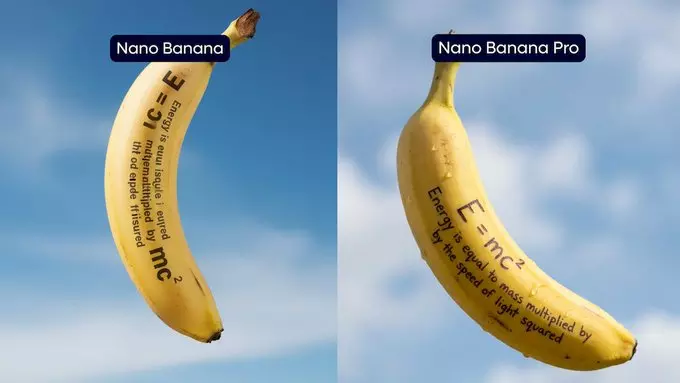
Nano Banana Pro, the most advanced image-generation and editing model ever launched by Google, was designed with Gemini 3 Pro architecture. The new version introduces a host of significant upgrades, primarily in the areas of handling text within images, world-knowledge reasoning, and creative control.
What Is Nano Banana Pro?
Google claims that Nano Banana Pro is a "state-of-the-art model" in AI capable of generating stunning images, while also comprehending real-world context. It combines Gemini 3 Pro's reasoning to create context-rich information graphics and diagrams — ideal for turning notes or data into meaningful visuals.
It includes, among others, legible text rendering in multiple languages. Nano Banana Pro can handle everything from short taglines to long paragraphs-whether you're designing posters, mockups, or storyboards-easily maintaining clarity and style.
Creative Power and Control
Nano Banana Pro gives creators unprecedented flexibility. You can blend up to 14 images, while preserving the likeness of up to five people-a big leap in consistency and compositional depth.
Image editing includes studio-grade controls to change angles, adjust lighting, even switch from day to night, refine focus, and colour grading. It supports multiple aspect ratios, with options to export in 2K or 4K resolution.
How do you use it? - How to Use It?
Getting started with Nano Banana Pro is easy as:
1. Open the Gemini application or go to the Gemini website.
2. Log in with your Google account.
3. Select the “Thinking with 3 Pro” model.
4. Under Tools, select “Create images” to start designing.
Free users receive a limited quota, while Google AI Plus, Pro, or Ultra subscribers have expanded access. In the U.S., Pro users can also use Nano Banana Pro in the Search AI mode.
Prompt Ideas to Try
Google recommends designing prompts thoughtfully: include details like subject, composition, action, location, style, and editing instructions. Here are some sample prompts from Google:
Create an infographic on how to make elaichi chai.
"A bright, striking 'TYPOGRAPHY' design set on a textured off-white background. The letters are bold, blocky, extra condensed, and have a 3D effect … overlapping layers of bright blue and hot pink … 16:9 aspect ratio."
“Change aspect ratio to 1:1 by reducing background. The character remains exactly locked in its current position.”
Additional Features & Safety.
Nano Banana Pro embeds SynthID watermarks into the images it generates, helping both users and platforms identify AI-generated content.
It's not just available in Gemini; the tool is being introduced across Google's ecosystem, spanning programs like Google Slides, NotebookLM, and Vids, which enable people to create visuals directly within work tools.
Why It Matters
Nano Banana Pro is a game-changer for designers, educators, marketers, and creators alike. It bridges the gap between raw ideas and polished visuals, whether you're sketching storyboards, building infographics, or designing social media assets. Its reasoning capability means that what you create isn't just pretty eye candy but informative and contextually accurate.
The article has been authored by Siftpreet kaur, an intern at Deccan Chronicle
( Source : Deccan Chronicle )

Next Story